Edge Lighting - Borderlight
- 4.8
- Rating
- 50.00M
- Installs
- Free
- Price
 Analysis by App-foxy
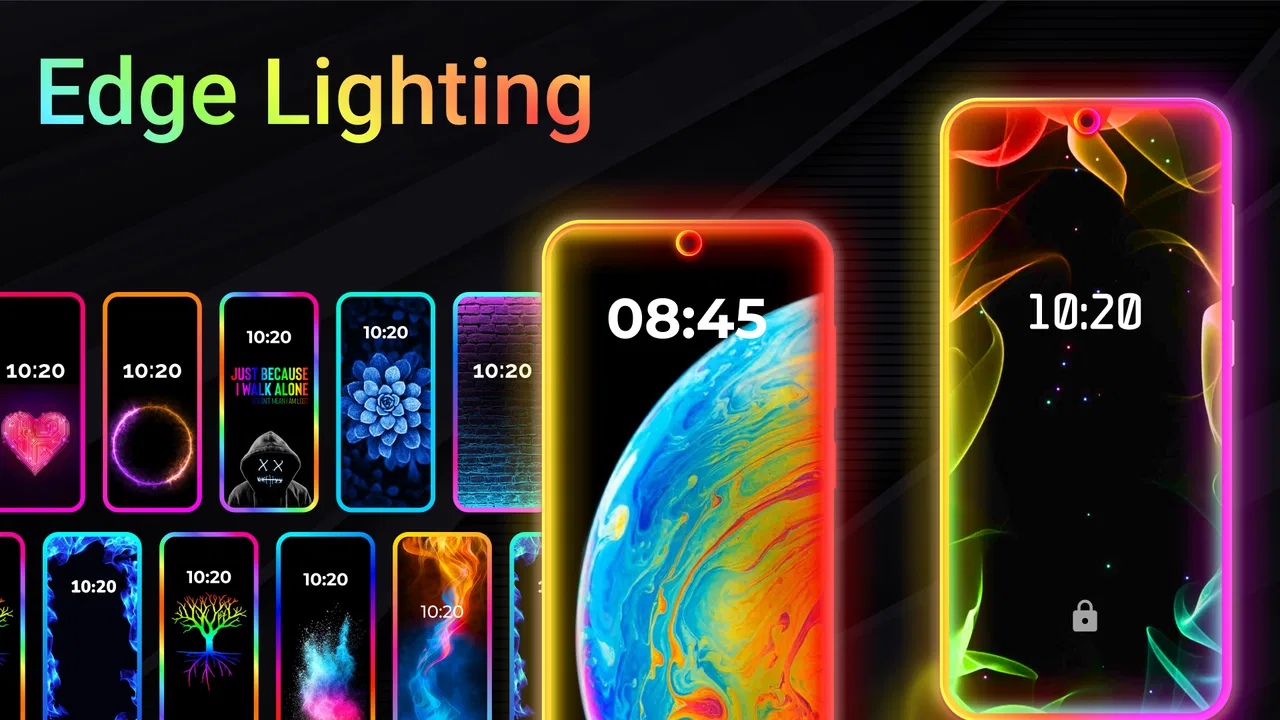
I first noticed Edge Lighting - Borderlight because it changes something many people normally ignore: the narrow space around the screen. Instead of treating the display as a flat rectangle, the app adds colorful edge effects and live wallpaper options that make a phone feel more personal. After spending time with it, I see it as a playful personalization app rather than an essential tool. It is best when you want your device to look distinctive at a glance, especially on a desk or bedside table.
The app comes from ZipoApps and is free to install, with optional in-app purchases ranging from $0.99 to $149.99 per item. It is rated for Everyone, works from Android 5.0 onward, and the current version is 3.3.17. Those details make it accessible to a wide range of Android phones, although the visual result naturally depends on the screen shape, display settings, and how much customization your device already supports.
How the border effect works in everyday use
The main appeal is visual rather than practical. You choose an edge-lighting style or a live wallpaper, then use the result to give the phone a more noticeable identity. The border can act like a soft frame around the display, while the animated backgrounds add movement behind icons and widgets. I found the combination more enjoyable than using either feature alone because the wallpaper fills the screen and the border gives the phone a distinct outline.
You May Also Like

 Pandora - Music & Podcasts
Pandora’s Music Is Easy to Start, but Harder to Recover
Pandora’s strength is its low-effort path from a seed to a station. Its weak spot is how much confidence it asks you to place in connection, setup, and quiet recovery.

 8 Ball Pool
 Is Built on Rivalries, Rematches, and Routine
A close look at the rivalries, rematches, shared routines, and unanswered safety questions that turn a quick pool match into a persistent mobile community.

 Samsung Music
’s Quiet Strength Is Playing What You Already Own
Its reach comes less from spectacle than from dependable access to a personal library. That simplicity is both the app’s strongest retention engine and its ceiling.

 AccuWeather: Weather Radar
AccuWeather Review: A Quick, Clear Forecast for Everyday Decisions
For everyday plans, the best forecast is the one you can understand quickly. AccuWeather makes rain timing, radar, and local conditions easy to act on, with a few trade-offs.

 Hill Climb Racing
Why Hill Climb Racing Still Turns Crashes Into One More Run
A tiny car, a bumpy hill and one more upgrade: Hill Climb Racing keeps resurfacing because its simple chaos makes every near-miss feel personal.

 AliExpress - Shopping App
AliExpress Makes Global Shopping Feel Personal, but Shoppers Bear the Risk
AliExpress turns a global marketplace into a pocket-sized discovery engine. Its reach is useful, its shopping loop compelling, and its trade-offs easy to miss.
More From Our News Desk
View All News


That makes the app particularly suitable for shared spaces. Imagine a household where several phones sit on the same kitchen counter. A bright border style or a recognizable background can make it easier to tell devices apart without picking each one up. This is not a security feature and it does not identify the owner in a reliable way, but it can reduce the small daily confusion caused by similar-looking phones.
I would also use it in a shared living room or home office where a phone is placed face-up during charging. The edge effect can make the device look more intentional instead of leaving it with a plain, inactive screen. For someone who enjoys matching a phone to a room, an occasion, or a personal color preference, this is where the app feels most worthwhile.
There is an important trade-off, though. A moving wallpaper and bright border are attention-grabbing by design. If you prefer a quiet, low-distraction screen, the same effects that make the phone attractive may become irritating. I would not recommend choosing the most animated style simply because it looks impressive in a preview. On a phone used for reading, navigation, or work, a calmer border is usually easier to live with.
Choosing a style for different people
For my own use, I would separate the choices into three groups: subtle borders for everyday use, stronger colors for social or decorative settings, and animated wallpapers for moments when appearance matters more than restraint. This approach avoids the common mistake of treating the most colorful option as the best option.
A teenager may enjoy a vivid effect that makes the phone feel expressive, while another person in the same home may prefer a thin, restrained glow. Since the app is rated Everyone, it can suit a broad audience, but the age rating should not be confused with a family-management system. It tells you about the content classification, not who can change the phone’s appearance or what another household member may select.
That distinction matters on shared devices. If several people use one Android phone, I would agree on a basic visual style before installing a particularly busy live wallpaper. Personalization is harmless when everyone understands that it changes the device for all users, but it can become a source of friction when one person treats the phone as a private canvas and another relies on a calmer screen.
Setup boundaries before you hand over the phone
The most useful setup habit is to decide who owns the final choice. On a personal phone, that answer is easy. On a family tablet or a device passed between people, it is less obvious. I would let the primary user choose the border and wallpaper, then show other users how to recognize the active style without assuming they should change it themselves.
This is especially helpful when a child borrows a parent’s device. The app can make the screen more colorful, but it should not be presented as a child profile, a content filter, or a way to separate personal areas. It does not replace the account boundaries already provided by the operating system or by other family tools. If your goal is to control access, manage screen time, or keep work and personal information apart, another solution is more appropriate.
I also recommend checking the result in the exact situation where the phone will be used. A border that looks balanced on a bright display may feel intense at night. A wallpaper that seems lively in a quick preview can make icons harder to notice once the home screen is full. I would test the chosen design with the usual icons, widgets, and lock-screen habits rather than judging it in isolation.
On older hardware, the minimum operating system is not the same as a guarantee of identical performance or appearance. The app can run on Android 5.0 and later, but phones differ considerably in screen proportions and software behavior. If the border does not align perfectly with the visible edges, or if a particular effect feels less smooth, that is a reason to try a simpler design before abandoning the whole app.
Coordinating a look across a household
One interesting use is creating a small visual system for several household devices. I would not try to make every phone identical, because that defeats the point of personal expression. Instead, I would choose a shared idea, such as cool colors for work devices and warmer colors for personal phones, while allowing each person to pick a different pattern within that idea.
This can be useful in a home where phones are often placed together. A consistent color family gives the devices a coordinated appearance, while different border styles preserve individual identity. It also works for a couple sharing a bedside table: one person can use a restrained edge, and the other can choose a more animated design without either phone looking completely unrelated.
The app is less useful when coordination requires separate profiles, automatic switching between users, or strict control over who may edit the setup. I would not assume that a shared-device arrangement creates separate personalization spaces. The practical approach is simple agreement: decide which person makes changes, and treat the selected design as part of the device’s current setup rather than as a private account setting.
Another small but valuable tip is to coordinate around visibility, not just color. If a phone is commonly used in a dim bedroom, choose an effect that remains comfortable when the lights are off. If it is used in a bright kitchen, a stronger contrast may be easier to notice. The best household setup is not the one that looks most dramatic in a screenshot; it is the one that remains readable and acceptable in the places where the device actually lives.
Age, trust, and the limits of personalization
Because the app is suitable for Everyone, I can understand why a family might let a younger user explore it. The choices are visual, and the basic appeal is easy to understand. Still, I would keep the conversation focused on device ownership and consent. A child selecting a wallpaper on their own tablet is different from changing the appearance of a parent’s work phone without asking.
That is where trust matters more than the app itself. The software gives the device a new look, but it does not create a boundary between people. If a phone contains private conversations, work material, or personal photos, the question is not whether the border is appropriate; it is whether the user should be changing that phone at all.
I would also avoid describing the visual effects as notifications unless the phone’s own system clearly presents them that way. A decorative border may draw attention, but decoration is not the same as a dependable alert system. Anyone who needs to notice calls, messages, or reminders should continue relying on the phone’s standard notification settings and accessibility options.
For older relatives or guests, a highly animated design may be less comfortable than a static or restrained one. The app’s broad age rating does not mean every style suits every viewer. I would choose based on readability, brightness, and familiarity, especially when the phone is used by someone who does not enjoy frequent visual changes.
What the free version means in practice
The app is free, which makes experimenting easy. You can approach it as a low-commitment way to refresh a phone’s appearance rather than deciding in advance that you need a premium customization package. The optional purchases are present, with individual items priced from $0.99 to $149.99, so I would pay attention during selection and avoid assuming that every attractive option belongs to the free experience.
That wide purchase range is the biggest reason I would involve the primary account holder before buying anything on a shared device. A child, guest, or family member should not be left to interpret purchase prompts alone. If the phone is used by more than one person, agree on whether the free selections are enough and who, if anyone, is allowed to approve an optional item.
I also think the app works best when you treat purchases as optional decoration rather than a requirement for a usable phone. The basic idea is already clear without spending money: add a border effect, try a wallpaper, and decide whether the change improves the device. If the phone feels more distracting afterward, buying more styles will not solve the underlying problem.
Where it beats ordinary wallpaper choices
The usual alternative is to pick a still image from the phone’s gallery or use the wallpaper options built into Android. Those choices are often simpler and more predictable. They are a better fit if you want minimal battery and attention impact, or if your priority is displaying a personal photo without extra visual framing.
Edge Lighting - Borderlight has a different strength: it treats the outline of the display as part of the design. That makes the phone recognizable even when the background is dark or visually plain. For someone who enjoys ambient decoration, that extra frame is more distinctive than changing a single image.
Compared with a manufacturer’s built-in edge effects, the app is appealing when you want to explore a dedicated collection of colorful looks rather than stay within the phone maker’s standard choices. The trade-off is that built-in tools are often more tightly integrated with the device. They may feel more consistent with the system, while a separate personalization app can require more trial and adjustment to find a style that fits the screen properly.
Compared with a simple launcher or icon pack, this app focuses on atmosphere rather than reorganizing the home screen. It will not replace a launcher if you want custom gestures, app layouts, or icon management. I would choose this app for visual mood and choose a launcher for deeper control over how the phone behaves and navigates.
Who should install it, and who should skip it
I think it is a good match for people who enjoy changing their phone’s appearance, want a more noticeable edge effect, or need a simple visual distinction between devices in a busy household. It also suits anyone who likes experimenting without committing to a full launcher replacement. With an average rating of 4.8 from around 732 thousand ratings and more than 50 million installs, it is clearly a widely used personalization choice, though popularity does not remove the need to check whether the style suits your own screen and habits.
I would skip it if you prefer a static, distraction-free home screen, rely heavily on battery-conscious settings, or expect a shared device to offer separate customization spaces automatically. I would also look elsewhere if your main goal is parental management, privacy separation, notification control, or productivity. This is a visual layer, not a household administration tool.
The app’s release date was May 28, 2020, and its current version is 3.3.17. I mention that because the software has had time to become an established option, but the age of the project also reinforces a practical point: do not judge it solely by the first preview. Test the effect on the actual phone, with the actual room lighting and the actual people who use the device.
In my experience, the strongest result comes from restraint. A moderate border paired with a readable wallpaper can make a phone feel fresh without turning every glance into a visual interruption. For a shared household, the most successful setup is one that everyone understands, one person is responsible for changing, and no one mistakes for a privacy or safety feature.
My final recommendation is positive, with clear limits. Edge Lighting - Borderlight is worth trying if your goal is expressive screen decoration and a more recognizable device outline. It is free to start, accessible to a broad range of Android phones, and flexible enough to support personal or coordinated household styles. I would keep purchases supervised on shared devices, choose calmer effects for nighttime or older users, and use the phone’s normal system tools for anything involving accounts, notifications, or protection.
For me, that makes it a pleasant optional upgrade rather than a must-have. If a plain wallpaper already gives you the calm and clarity you want, you may not gain much. But if your phone feels anonymous, if several devices are constantly mixed together, or if you simply enjoy a colorful edge around the display, this app offers a straightforward way to make the device feel more like yours.
FAQs for Edge Lighting - Borderlight
01What is Edge Lighting - Borderlight and how does it work?
Edge Lighting - Borderlight is an app that adds a visually appealing borderlight effect to the edges of your smartphone screen. It works by illuminating the edges of your device with customizable colors and patterns, creating a unique and dynamic look. The app is designed to enhance the appearance of any screen, even when the device is locked.
02Is Edge Lighting - Borderlight compatible with all devices?
Edge Lighting - Borderlight is compatible with most Android devices. However, compatibility may vary depending on your device's software version and screen type. It's always a good idea to check the app's requirements and user reviews to see if it works smoothly on your specific device model before downloading.
03How can I customize the edge lighting effects?
The app offers a range of customization options. Users can select different lighting colors, styles, and animations to suit their preferences. You can adjust the thickness of the borderlight, choose specific colors, and even set different effects for different conditions, like notifications or charging. This level of customization allows you to personalize your device's appearance fully.
04Does Edge Lighting - Borderlight drain my device's battery?
While Edge Lighting - Borderlight is designed to be efficient, any application that uses lighting effects will consume some battery. The app allows you to adjust settings to minimize battery usage, such as reducing brightness or limiting the effect to certain conditions. Users generally report that the impact on battery life is minimal with moderate use.
05Is there a cost associated with downloading or using Edge Lighting - Borderlight?
Edge Lighting - Borderlight is typically available for free with optional in-app purchases. These purchases may unlock additional features or remove ads. It's important to review the app's details on the Google Play Store before downloading to understand any potential costs associated with premium features.
Pros
- Enhances device aesthetics with vibrant edge lighting.
- Customizable colors and styles to suit personal taste.
- Works seamlessly with notifications for visual alerts.
- Low battery consumption
- ensuring efficient performance.
- Supports various screen sizes and resolutions.
Cons
- Limited compatibility with some older devices.
- May interfere with other notification settings.
- Occasional glitches in edge lighting patterns.
- Ads can be intrusive in the free version.
- Customization options might overwhelm new users.

Edge Lighting - Borderlight
Gallery